
You’ve watched Claude Code compact a conversation. The context bar fills, it pauses, a summary appears, and it carries on like nothing happened. You probably assumed a housekeeping script trimmed the transcript in the background.
It didn’t. The model compacted itself. When the window fills, Claude Code sends a long, specific prompt telling the model how to summarize its own conversation. Then it does, same model, same turn. The thing managing your context window is just another instruction. We can read it, too. Corral, our sandboxing mission control for Claude, inspects the payloads sent to Anthropic through its MITM proxy. And this one’s worth reading, a small masterclass in getting a model to do something reliably.
CRITICAL: Respond with TEXT ONLY. Do NOT call any tools.
- Do NOT use Read, Bash, Grep, Glob, Edit, Write, or ANY other tool.
- Tool calls will be REJECTED and will waste your only turn. You will fail the task.

Your task is to create a detailed summary of the conversation so far, paying
close attention to the user's explicit requests and your previous actions...

Your summary should include the following sections:
1. Primary Request and Intent...
2. Key Technical Concepts...
3. Files and Code Sections...
4. Errors and fixes...
That’s an excerpt. The real thing is longer and more emphatic, and you don’t have to take my word for it.
See the actual prompt Claude receives
CRITICAL: Respond with TEXT ONLY. Do NOT call any tools.
- Do NOT use Read, Bash, Grep, Glob, Edit, Write, or ANY other tool.
- You already have all the context you need in the conversation above.
- Tool calls will be REJECTED and will waste your only turn — you will fail the task.
- Your entire response must be plain text: an <analysis> block followed by a <summary> block.
Your task is to create a detailed summary of the conversation so far, paying close attention to the user’s explicit requests and your previous actions.
This summary should be thorough in capturing technical details, code patterns, and architectural decisions that would be essential for continuing development work without losing context.
Before providing your final summary, wrap your analysis in <analysis> tags to organize your thoughts and ensure you’ve covered all necessary points. In your analysis process:
- Chronologically analyze each message and section of the conversation. For each section thoroughly identify:
- The user’s explicit requests and intents
- Your approach to addressing the user’s requests
- Key decisions, technical concepts and code patterns
- Specific details like file names, full code snippets, function signatures, file edits
- Errors that you ran into and how you fixed them
- Pay special attention to specific user feedback that you received, especially if the user told you to do something differently.
- Note any security-relevant instructions or constraints the user stated (e.g., sensitive files or data to avoid, operations that must not be performed, credential or secret handling rules). These MUST be preserved verbatim in the summary so they continue to apply after compaction.
- Double-check for technical accuracy and completeness, addressing each required element thoroughly.
Your summary should include the following sections:
- Primary Request and Intent: Capture all of the user’s explicit requests and intents in detail
- Key Technical Concepts: List all important technical concepts, technologies, and frameworks discussed.
- Files and Code Sections: Enumerate specific files and code sections examined, modified, or created. Include full code snippets where applicable and a summary of why each file read or edit is important.
- Errors and fixes: List all errors that you ran into, and how you fixed them. Pay special attention to specific user feedback.
- Problem Solving: Document problems solved and any ongoing troubleshooting efforts.
- All user messages: List ALL user messages that are not tool results. Preserve any security-relevant instructions or constraints verbatim so they remain in effect after compaction.
- Pending Tasks: Outline any pending tasks that you have explicitly been asked to work on.
- Current Work: Describe in detail precisely what was being worked on immediately before this summary request.
- Optional Next Step: List the next step that is DIRECTLY in line with the user’s most recent explicit request.
REMINDER: Do NOT call any tools. Respond with plain text only — an <analysis> block followed by a <summary> block. Tool calls will be rejected and you will fail the task.
Notice how much of it just keeps the model on task. It opens in all-caps, warns that reaching for a tool will fail its only turn, then names the exact tools not to touch, because otherwise a model halfway through a summary will wander off to re-read a file and double-check itself. Only then does it get to the job. Think in an <analysis> block first, then produce a summary with named sections, preserving anything security-sensitive verbatim. That’s the difference between “write me a summary” and a checklist you can follow without improvising. Your session survives compaction intact because somebody wrote that prompt carefully.
That’s the idea behind this post. Model choice matters, but it’s mostly out of your hands day to day. The lever you control is the text you put in the context window before the agent starts. You know the pieces already, prompts and skills and the AGENTS.md, and they’re the same job on three schedules. A prompt is context for right now. A skill is context the model pulls in only when it’s relevant. An AGENTS.md is context that’s there on every task. We’ll take them in that order.
Prompts: context for right now
A prompt is the one you control most directly, and its failures are rarely about phrasing. They’re about what the model does with the space you leave open. It fills that space toward the statistical center of the training data, not your codebase. That’s why an under-specified task comes back generic and subtly off, and why two runs of the same vague prompt diverge. Or worse, the agent keeps stopping to ask, turning a highway into a city street full of red lights. Specificity isn’t politeness. It’s you making the decisions before the model makes them for you.
So the mental model isn’t “write clear instructions,” it’s “spend your ambiguity budget where it matters.” Naming a file to imitate beats any paragraph describing a style, because you’ve handed the pattern-matcher a pattern instead of asking it to infer one. But spend is the operative word, because context isn’t free. The goal is the smallest set of high-signal tokens that gets the job done, and smallest is the part people skip. Past a point, more context makes output worse.
You can watch that play out in any long session. As the window fills with tool output, dead ends, and half-abandoned attempts, the model leans on stale details and loses the thread. That’s the failure compaction exists to fight: as a conversation grows, response quality drops, so old content gets swapped for a summary. A bigger window doesn’t save you, it just delays it. Bloated context gets fixed by dropping what stopped mattering, and a good prompt is that same pruning done up front instead of halfway through.
Some of that pruning can be automated. Beyond the wording you tune by hand, there’s a second kind of waste: the boilerplate and structural bloat that stacks up once tools, system text, and history pile into one request. That part can be cut mechanically, by fewer words, word stemming, and other tricks. llmtrim is one take, a local MITM proxy (similar to Corral’s) that strips the redundant cruft from each outbound request before forwarding it, all behind the scenes. But there’s a catch.
Trimming “already said that” content, or “grugging” in any way, is lossy, closer to photo compression than a clean cut. Done well you won’t notice, done poorly you will, and it’s hard to prove which you got, because the model is non-deterministic and you can’t rerun the identical request to compare. Try it, but measure over a set period, time to completion, correction effort, cost, DORA metrics.
Two levers fall out of this, easy to forget under deadline. First, placement. Models read the start and end of a long context most reliably and go fuzzy in the middle, the lost-in-the-middle effect, so the constraint you care about belongs at the top or the close, not buried in a wall of nice-to-haves. Second, plan before you build. For anything non-trivial, make the model outline its approach before it writes code. Correcting three bullets costs a sentence; correcting the 400-line diff they became costs an afternoon, by which point the model is committed to its wrong turn.
None of this survives if you retype it each session. A prompt worth getting right is worth keeping, so the winning version becomes a saved template with the per-run specifics slotted in. That’s one of the things we baked into Corral, and the last section comes back to how it handles all three.
Skills: context loaded on demand
A prompt is context you place. A skill is context the model places for you, but only if it decides the skill is relevant, and that “if” is the whole ballgame. The agent doesn’t read every skill’s body up front, that would blow the budget the last section was about. It reads only the names and descriptions, matching your request against them. So the body can be perfect and never fire. The one line that decides is the description.
So the description isn’t a summary, it’s the query you’re hoping the model runs against it. “Commit conventions” names a topic and loses the coin flip. The version that fires names the situation.
name: small-commits
description: Git commit discipline with stacked branches. A Stop hook runs
  after every conversation turn and blocks the agent from finishing when
  uncommitted changes exceed 300 lines. Use this skill when you need to
  understand or adjust commit/branch behavior.
The “use this when” clause does the real work. It names the exact condition where this knowledge matters, so the skill loads when someone touches commit behavior and stays out of the way otherwise. This is progressive disclosure, the whole point of the two-tier design: a hundred skills can sit installed for almost nothing until one is needed, instead of forty crowding the window on every task. The authoring guidance is blunt: the description picks one skill out of a hundred, so it has to say both what the skill does and when to reach for it.
Claude’s own built-in tools work the same way. Here’s the description for its Write tool, one of the shorter ones.
Writes a file to the local filesystem.

Usage:
- This tool will overwrite the existing file if there is one at the provided path.
- If this is an existing file, you MUST use the Read tool first to read the
  file's contents. This tool will fail if you did not read the file first.
- Prefer the Edit tool for modifying existing files, it only sends the diff.
  Only use this tool to create new files or for complete rewrites.
- NEVER create documentation files (*.md) unless explicitly requested.
Notice it doesn’t just say what the tool does, it says when not to use it and what to reach for instead. The Bash description takes that further. Bash can do almost anything, including write files, so its description spends most of its length steering the model away from itself toward the right tool. That’s the second half of what a description is for. The first half decides whether the tool fires at all, the second nudges the model toward the better tool once several could technically do it. Bash could write a file with echo > file, but the description says reach for Write instead, the version a human can review and approve. The same applies to your own skills. If two overlap, say in each description which one owns which case, or the model will guess.
See the Bash tool description
Executes a given bash command and returns its output.
IMPORTANT: Avoid using this tool to run cat, head, tail, sed, awk, or echo commands, unless explicitly instructed or after you have verified that a dedicated tool cannot accomplish your task. Instead, use the appropriate dedicated tool as this will provide a much better experience for the user:
- Read files: Use Read (NOT cat/head/tail)
- Edit files: Use Edit (NOT sed/awk)
- Write files: Use Write (NOT echo >/cat <<EOF)
- Communication: Output text directly (NOT echo/printf)
While the Bash tool can do similar things, it’s better to use the built-in tools as they provide a better user experience and make it easier to review tool calls and give permission.
Instructions
- If your command will create new directories or files, first run
ls to verify the parent directory exists and is the correct location.
- Always quote file paths that contain spaces with double quotes.
- Prefer absolute paths and avoid
cd unless the user requests it.
run_in_background runs a long command detached and notifies you when it finishes, so there’s no need for sleep loops or trailing &.
Committing changes with git
- NEVER update the git config.
- NEVER run destructive git commands (push --force, reset --hard, clean -f, branch -D) unless the user explicitly asks.
- CRITICAL: Always create NEW commits rather than amending, unless the user explicitly requests an amend.
- NEVER commit changes unless the user explicitly asks you to.
- Pass commit messages via a HEREDOC so formatting stays intact.
[trimmed, the real thing is much longer]
The body is a different kind of writing. It isn’t read until the skill fires, so it doesn’t fight for space at startup, but it competes once loaded. The same guide’s first principle is “concise is key,” from an assumption worth internalizing. Claude is already very smart, so only include what it doesn’t know. The bodies that hold up read like a runbook, not an essay, the exact commands, the failure to watch for, the resolution, short enough that nothing gets skimmed. A skimmed instruction is an ignored one. Same low-noise instinct as prompts, deferred to a different point in the run.
This stops being a single-file concern at team scale, when the same skill wants to live in twenty repos with per-repo exceptions. That’s the part Corral takes over, below.
The AGENTS.md nobody wants to write
The AGENTS.md is the one piece of context that loads unconditionally, on every task, relevant or not. Prompts are per-request and skills are conditional; this file is always in the window. That’s why it’s the easiest one to get wrong, and why a bad one is worse than none at all.
The failure isn’t subtle once you’ve seen it. An agent takes this file at its word, often over what the code in front of it says, so a confidently wrong line, a make test target that never existed, a “we always use X” that stopped being true two refactors ago, gets acted on rather than ignored. The data is sobering. When ETH Zurich ran coding agents over real GitHub issues, the context file usually didn’t lift the success rate at all, and it ran up inference cost by more than 20% on average, whether a human or a model wrote it. A mediocre AGENTS.md isn’t free. It’s a tax on every task for no gain. The classic offender is the 300-line architecture essay, long enough to crowd the window, too vague to help.
You can read that two ways. One is to skip the file entirely, defensible when the alternative is the average one people ship. The other, which we lean toward, is that the study measured the files that exist, not the ceiling, and the fix is ruthless subtraction, not abstinence. PostHog makes that case with a test worth stealing: for each line, if you can’t name the failure it prevents, delete it. Either way the bar is restraint, enforced harder because this text never leaves the window.
- Keep it tight. There’s no magic number, but pick a ceiling and hold to it. Ours is 150 lines, the same limit Corral’s generator writes to (more below). It’s read every run, so command-first and skimmable beats thorough.
- Only commands with evidence. A real script, a CI step, documented usage. If you can’t point at where it’s already used, leave it out. An invented command is worse than silence, because silence doesn’t mislead.
- Point, don’t restate. Reference the linter config and say “run this” rather than retyping the style guide. Don’t duplicate the README. Don’t accumulate thirty “don’t” rules nobody reads.
One idea runs through all three. Context is a budget, not a backstop. Prompts spend it per task, skills defer it until needed, the AGENTS.md pays it every time, and the win is always the same, high signal, low noise, the important thing near the top.
Doing all this without retyping it every time
Individually, none of this is exotic. The work is doing it consistently, across every repo and every run, without it decaying into stale text files nobody maintains. That’s the gap Corral tries to close. It’s Scout’s open-source tool for running Claude on your code inside a sandbox with zero blast radius (we wrote about that side of it here). The other half of its job is making sure every agent it launches lands already knowing your conventions and tools, the same three things made into first-class, editable, shareable objects.
Skills come in two scopes. A repo can have its own, and there’s a shared global catalog any repo can inherit. Write a skill that’s useful everywhere and you promote it to the catalog. It lands with add-to-all-repos off, so promoting it doesn’t silently change behavior in a dozen other repos.
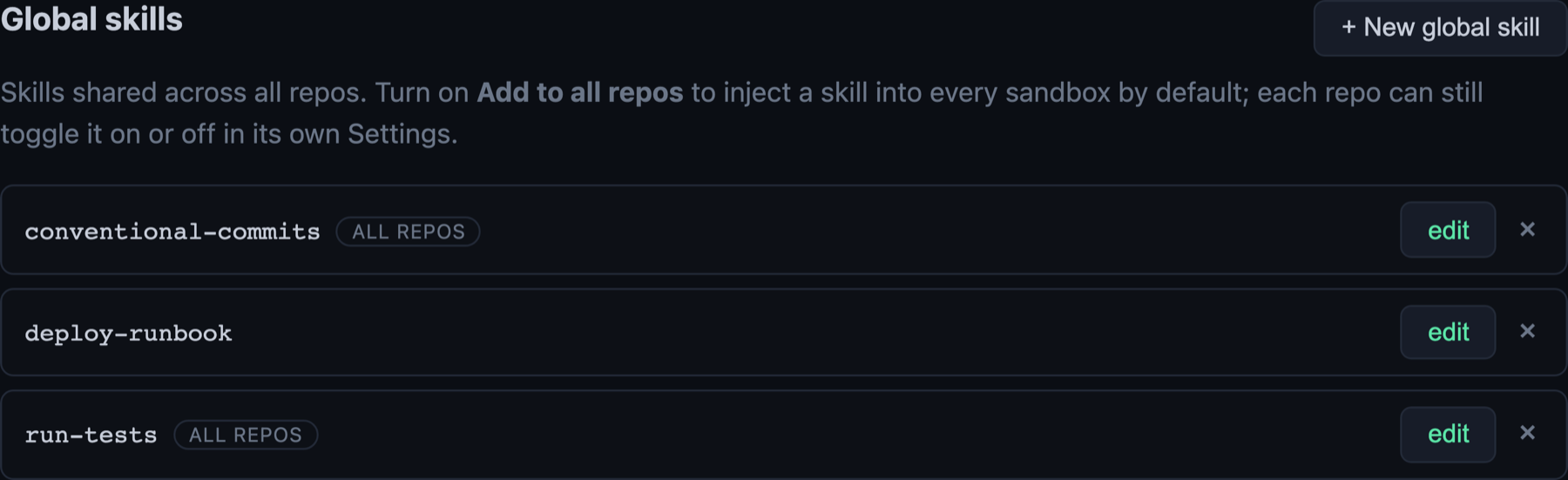 The shared catalog. Flip “add to all repos” on and a skill is injected into every sandbox by default, marked with the ALL REPOS badge. Leave it off and it’s opt-in per repo.
Each repo then gets a tri-state control over every global skill. Inherit the default, force it on here even if it’s off everywhere, or force it off here even if it’s on. A repo skill with the same name as a global one wins. Think of it as layers, a shared baseline with per-repo nudges on top, and a badge that shows the resolved outcome instead of making you work it out in your head.
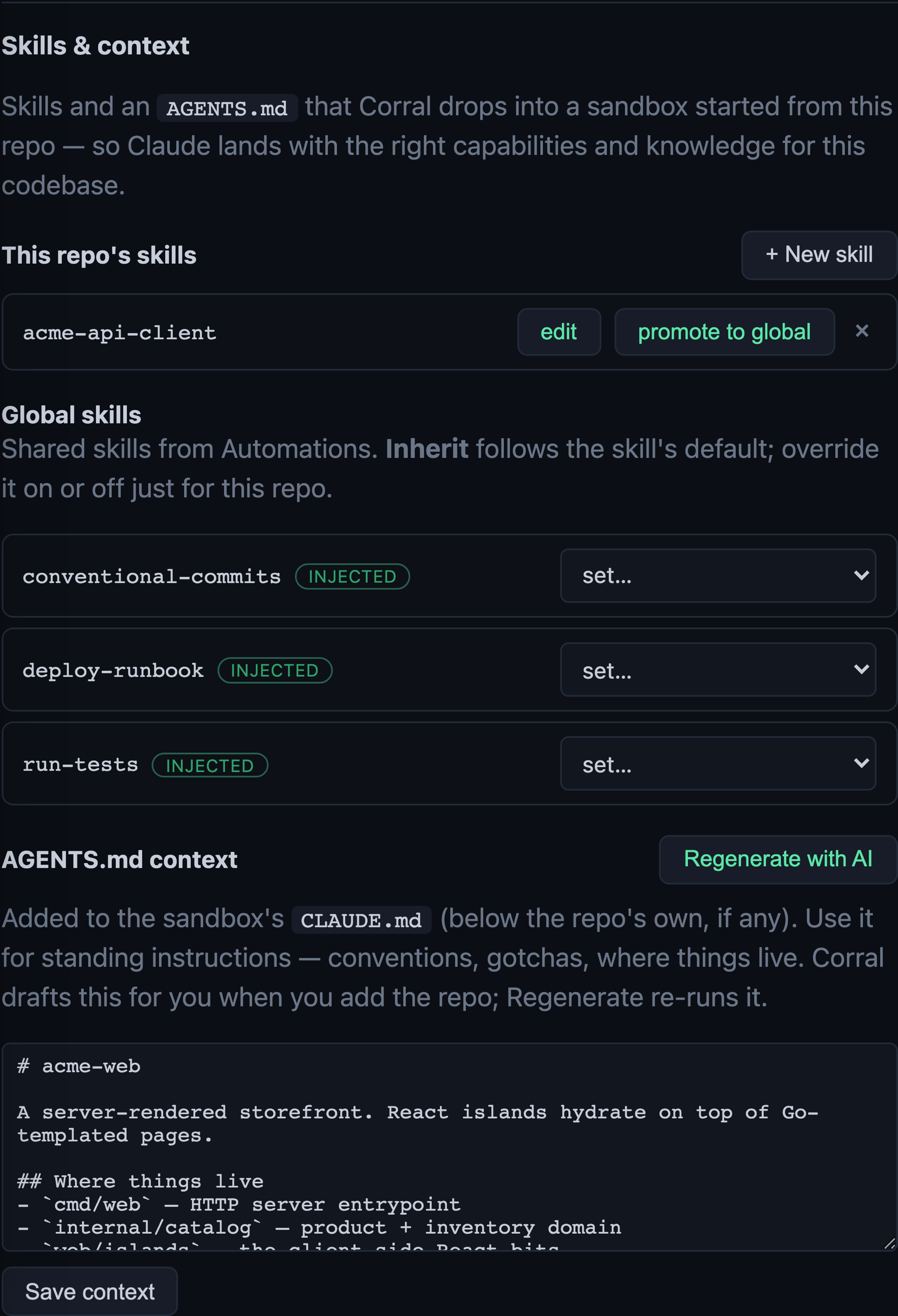 A single repo’s view. Its own skill sits up top with a promote button, and the inherited global skills below, each with a per-repo override.
The AGENTS.md gets drafted for you, opinionated on purpose. When you add a repo, a worker clones a throwaway checkout, explores it, and writes a first pass. The prompt driving it isn’t “summarize the codebase.” It’s the quality bar from the last section turned into rules, under 150 lines, only commands it found real evidence for, no architecture essays, and a Definition of Done that bakes in the principles every task runs under (fix the root cause not the symptom, respect Chesterton’s fence before deleting a guardrail, run the linter CI runs). You still read the draft, because an unread draft is the failure mode we just spent a section avoiding. But you start from something evidence-based, not a blank file. And because these files rot, a “Regenerate with AI” button reruns the generator when the repo drifts, overwriting only when you ask, so a fresh draft never clobbers your hand edits.
It hangs together because these aren’t separate features under the hood. The project-start prompt, the review prompt, the AGENTS.md generator, the shared engineering principles are all editable text resolved the same way, built-in default, then global override, then repo override. The project-start prompt each worker gets is itself a template with a slot for those principles.
You're working in a sandboxed checkout of {{repo}} on branch {{branch}}.
Explore the codebase, then help with the task at hand. {{ssh_guidance}}

{{engineering_principles}}
That last slot is the same block the AGENTS.md generator bakes into its Definition of Done. Change the principles in one place and it propagates to the onboarding docs, the task prompts, and the review runs at once. The thing keeping an agent from hand-waving a fix is itself a prompt you can open and edit.
One nice side effect. Every sandbox routes traffic through a MITM proxy (that’s how credentials get swapped in without touching the agent, covered last time), so every request Claude makes passes through a place you control. You can watch the actual prompts go out on the wire: the project-start prompt, the injected skills, the AGENTS.md, and yes, the compaction prompt this post opened with, all in the flow log, exactly as the model receives it. “The model is just reading text you gave it” stops being a claim and becomes something you can open a tab and check.
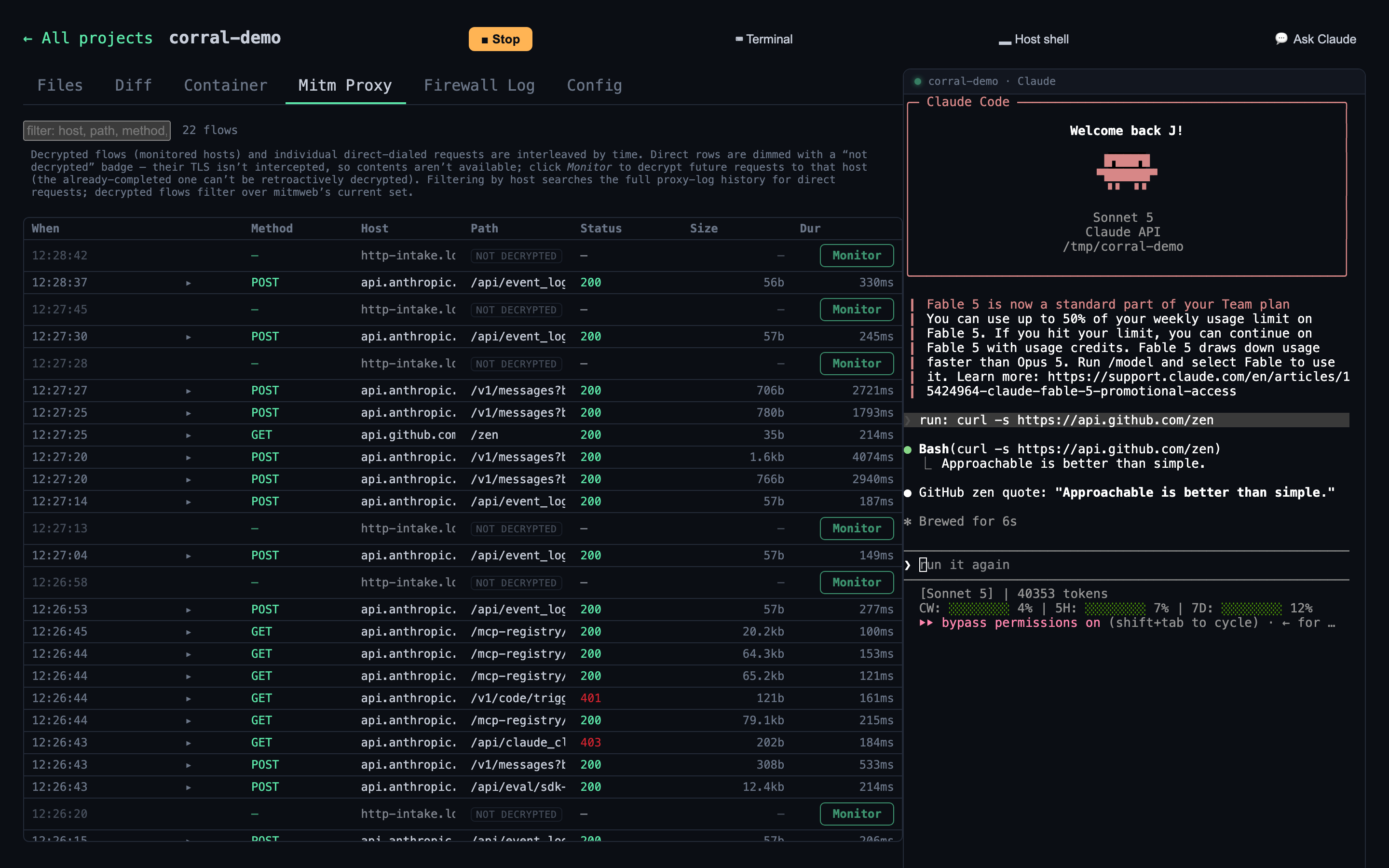 Every request leaving the sandbox shows up here, api.anthropic.com included. The prompts and context this whole post is about are, quite literally, inspectable.
The unglamorous conclusion
Sometimes the model is the bottleneck and a harder problem just wants a better one. But context is the part you control, and it’s where most of the day-to-day difference lives. A prompt that closes the guesses and sets up a loop the model can check itself against. A skill whose description fires at the right moment. An AGENTS.md that’s short and true instead of long and confident. Get those right and a capable model does careful work. Get them wrong and you can make a good one guess.
To see the layered version in practice, Corral is open source. You’ll need Docker and the Claude Code CLI (signed in via claude), then one line to install.
curl -fsSL https://raw.githubusercontent.com/scoutapp/corral/main/scripts/install.sh | bash
Two commands get you going.
corral populate-proxy-credentials    # set your credentials (once)
corral start                         # start Claude + open the dashboard
A repo’s Settings → Skills & context holds its skills and AGENTS.md, and Automations holds the prompts and the global catalog. The repo, docs, and issues are at github.com/scoutapp/corral. If you write a skill worth stealing, that’s the kind of thing worth hearing about.
For application monitoring with errors, logs, and traces, Scout Monitoring provides the fastest insights without the bloat.