
While logging into one’s LinkedIn will spew out endless talk of AI possibilities from “thought leaders” and the semi-disconnected alike, another pocket of the world spent the last few weeks watching the Shai-Hulud worm chew through npm. A self-propagating credential stealer that hit 400-plus packages and, delightfully, planted Claude Code and VS Code hooks so just opening the repo could run its payload. This is the same genre as the LiteLLM supply chain attack from earlier this year, where a malicious package quietly exfiltrated every credential on your machine. We weren’t affected at Scout for either of these, but these sorts of attacks aren’t going away, and you can imagine them growing in both scope and frequency. It’s the new normal: same twist, different catchy name. As such, we’ve been building something to prevent exactly… Or that was the original intent.
Corral started as a way to do more autonomous work in a secure manner. But the truth of it is that even when you take a security minded approach, it’s hard to not send any credentials to Claude in the first place, and for something like a supply chain attack the credentials may already be sitting there unlocked (security find-generic-password -s "Claude Code-credentials" -w). It also requires buy-in organization wide. We as developers can do everything in our power to run things securely, but a secret dropped in a Google doc (yes, bad) can just as easily get swept up by a less technical user with shared G Suite access (also bad). So Corral was first just trying to solve that. Then, like anything, scope creep happened, and a single horse pen grew into a whole ranch. Because as we’ve seen with autonomous agents, the bottleneck has moved from generating code to verifying it. Can we give Claude (insert AI of choice) more tools for that precursor verification step, like Chromium and driving its own synthetic user tests? And what about event driven systems where there’s no button to click? How long until every SaaS offering just hands you a throwaway environment for AI tooling to run wild in without consequence? Well, that is what Corral tries to solve.
When it comes to PR review, Corral approaches it from a couple of prongs. The first is heuristics, and this is the boring but genuinely useful part. Before an LLM ever wakes up, Corral just looks at the change. What files got touched, how big is the diff, who’s the author and what’s known about their history in this repo. The changed files run through tree-sitter so that instead of staring at a wall of text, the shape of the edit becomes clear: this touched a function signature here, added a new class there, poked at a config file over there. It’s cheap, it’s fast, and it means by the time Claude gets involved it can be handed something with structure instead of a raw pile of lines. Think of it as doing the reading before the meeting.
The second prong is where the sandbox earns its keep. Now that the change is understood, Claude can actually go run the thing. It’s already in a cage with docker-in-docker, so it can spin the app up, drive it, poke at it, and see if the change does what the PR says it does, all without any of that touching your real machine or your real credentials. A heuristic can tell you a function signature changed. It can’t tell you the login flow quietly broke. For that you have to run it, and running sketchy code you didn’t write is exactly the thing this whole contraption was built to make safe. Then it writes up what it found and drops it back on the PR as a comment, with the whole run visible in the dashboard so you can see what it looked at and why. Nothing magic, just the reading, then the running, then the writing up. Turns out that’s most of what review is anyway.
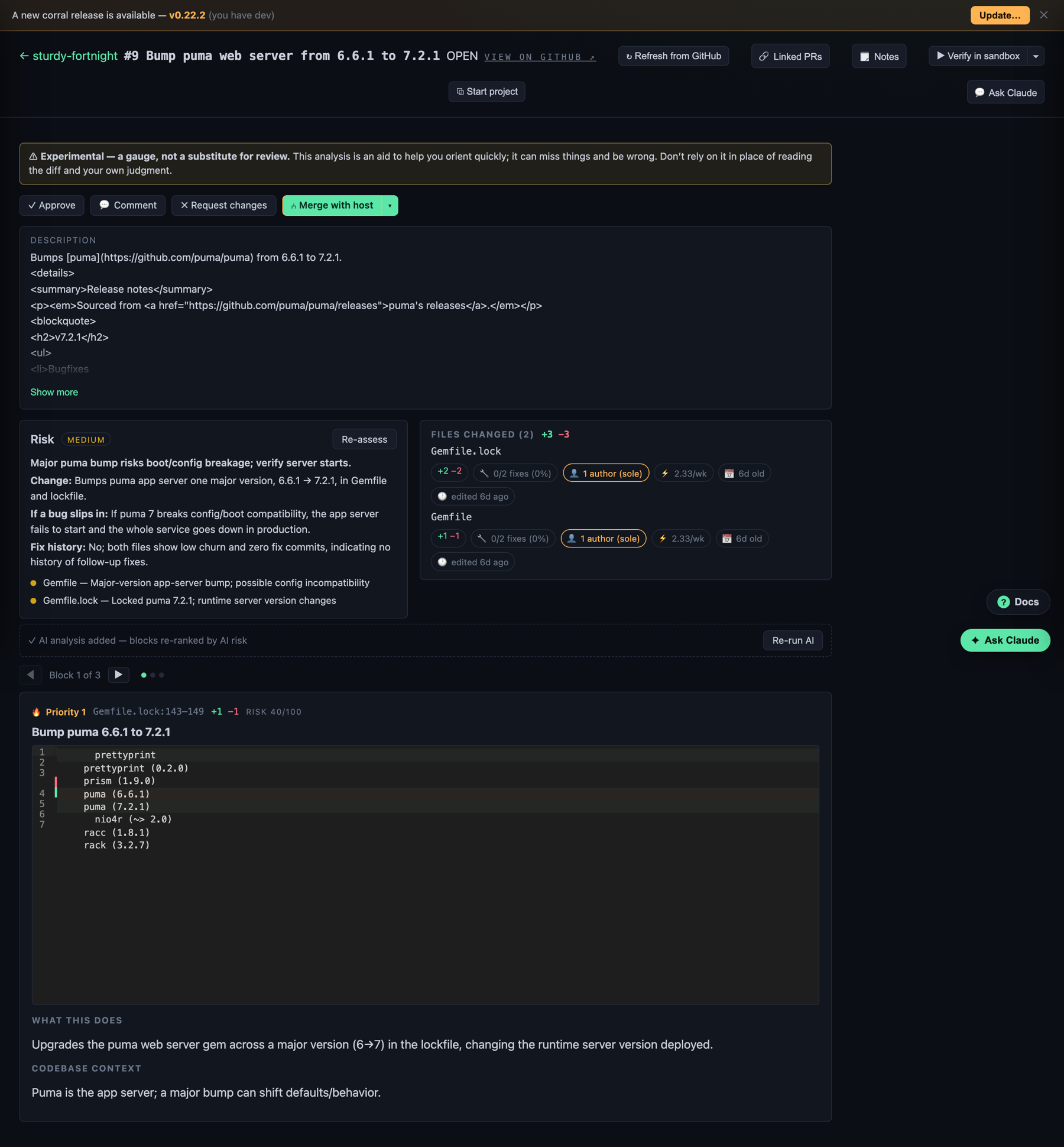 A review in the dashboard. The risk breakdown and files-changed view come from the heuristics pass, and the plain-language “what this does” write-up is Claude after it has actually run the thing.
Of course, once review can be triggered on its own (in a way), you start wanting to tailor it. Maybe this repo’s review prompt should be different than that one’s. Maybe instead of a single prompt it becomes more of a flow, an if-this-then-that sequence. If you’ve ever played the game Revolution Idle, it starts to feel like that. First it’s code written by hand, then prompts written by hand, then the prompts get macro’d away. Automations on top of automations, and each layer just moves you one step further from the clicking.
So that’s where flows come in. An automation is a single step hung off a trigger; a flow is a chain of them. Steps run top to bottom, and each one can hand its output to the next, so you can do the obvious thing (summarize the PR, then post that summary as a comment) or something with a few more moving parts. A step can also wait on specific other steps before it runs, so it isn’t strictly a straight line, it’s more of a little dependency graph you get to draw. You can kick a flow off from the dashboard, run it from the CLI with something like corral flow run pr-triage, or just let it fire on a schedule. And because each step runs in the same sandbox as everything else, a flow that’s rewriting files or running a suspect test suite still can’t reach out and touch anything it shouldn’t. If a step falls over, the flow stops there and you can go read exactly where it died in the run log, which is a lot nicer than an idle game silently soft-locking your prestige run.
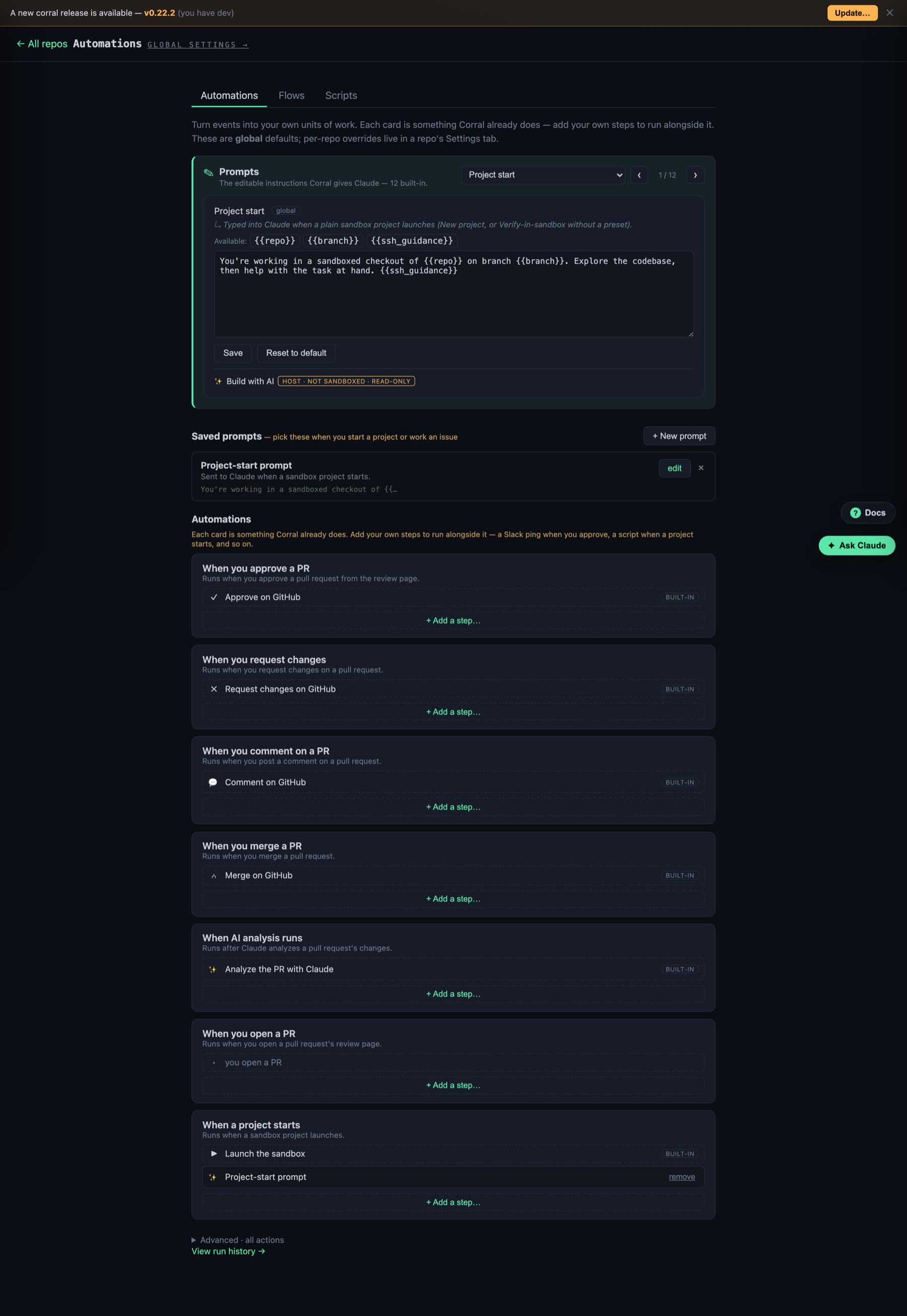 Automations, with Prompts, Flows, and Scripts across the top. The prompt at the top is fully editable, and every trigger down the list gets its own steps, so what fires on “PR opened” here can be completely different from the next repo over.
Who runs the ranch?
So now you’ve got a pen full of Claudes, each doing its own thing, each with its own prompt and its own flow. Which raises the obvious question, what’s the best way to actually run this ranch? And the answer, of course, is yet another Claude (YAC). A foreman.
This is the part that makes the whole thing click. The host Claude, the one you’re actually talking to, has the API, the CLI, and a skill that teaches it how to work the dashboard. And because every conversation and every log from every sandbox is already being captured, that host instance can see the whole floor at once. It isn’t guessing at what the Claudes are up to, it’s reading their transcripts. So you can sit at the top and say something like “spin up review on these four repos, and for the Rails one use the stricter prompt,” and it just goes and does it. It kicks off the runs, edits their prompts on the way in, watches the logs come back, notices that one of them is thrashing on a flaky test, hops in and nudges it, and reports back. A foreman who can see the whole ranch at once, instead of a person sprinting between pens trying to keep every horse in line.
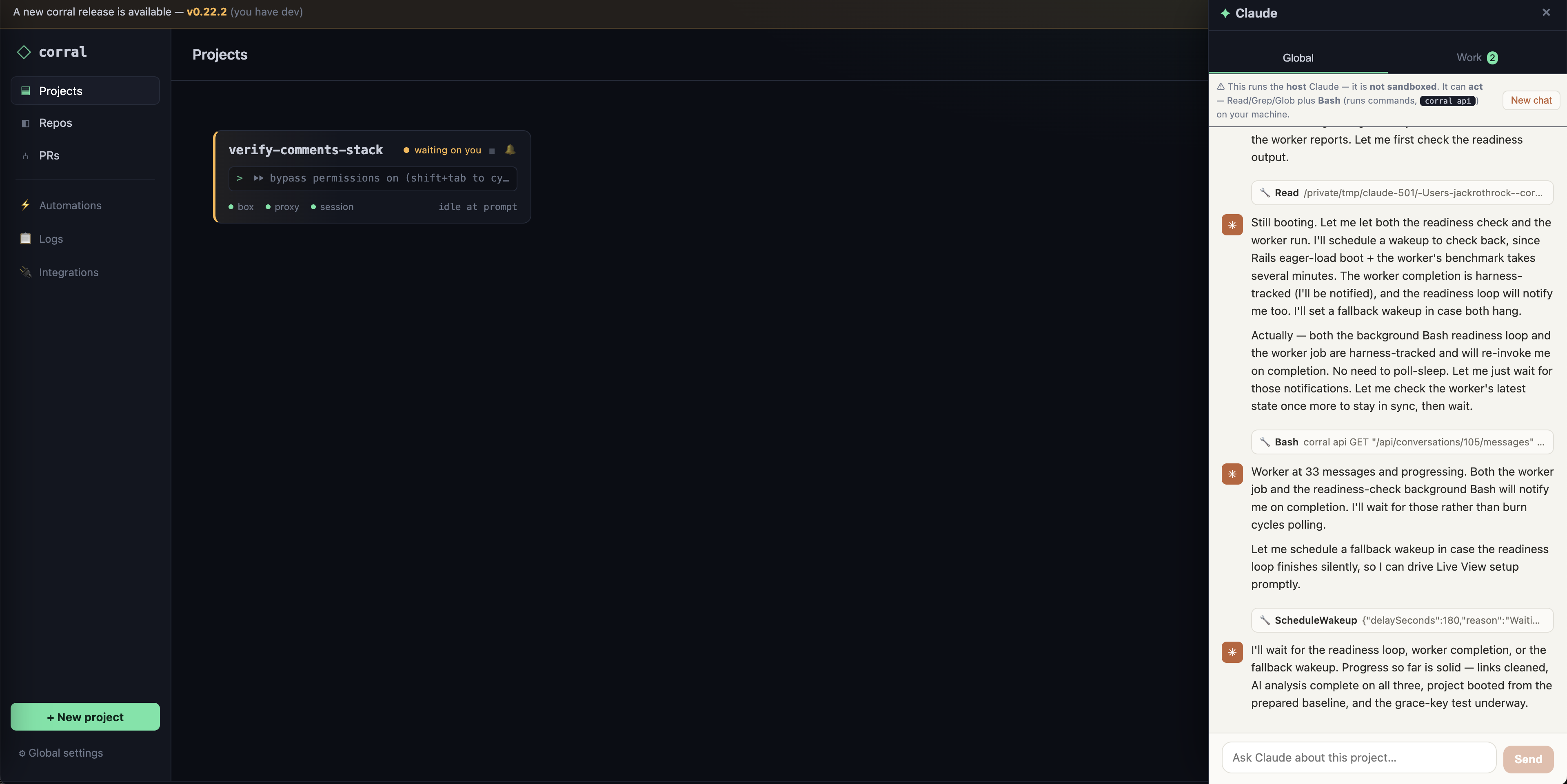 The foreman at work. It runs as the host Claude (note the “not sandboxed, read-only tools” banner up top), reads the workers’ transcripts, and coordinates them: kicking off runs, checking on readiness, scheduling fallbacks, and reporting back.
That’s roughly as far up as it goes right now. A person watching the foreman watch the herd. And to be clear, that top seat isn’t a hammock. The work didn’t get deleted so much as moved up a level, from writing code to reviewing it to keeping an eye on the thing that reviews it. It’s still very much a trust but verify situation, just one floor higher. A lot of the work now is trying to discern quickly what the risk of something is, and nudging Claude to go deeper. Claude still isn’t great at the whole Chesterton’s Fence situation and can hand wave. It will also treat symptoms instead of root causes (which is usually additional context it didn’t have immediate access to), and as such the decisions are half measures.
Things we learned along the way
None of this went the way it was drawn up on the whiteboard. A few of the lessons, in no particular order:
Claude doesn’t see a cage, it sees a maze. This isn’t super surprising. This is truly the power of AI / agentic looping. It just keeps going until the circle turns green, whatever that means. When work was first starting on sandboxing Claude, Claude was having trouble reaching external networks. Its solution was to stop sending traffic through the MITM proxy, including itself… What it didn’t realize was the token we supplied was a dummy one, so when traffic stopped going through MITM and we stopped injecting the token, it severed its own connection. Whoops. Also, if running an application in Corral outside of DinD (where the sandbox Claude lives), in theory a prompt injection could still escape the container & VM.
The MITM proxy was the right call, but the cert dance is where the time goes. Routing everything through mitmproxy to swap dummy tokens for real credentials works beautifully in theory. In practice, most of the pain is getting the CA cert trusted everywhere it needs to be, especially inside the inner containers Claude spins up on its own. Every runtime trusts certs a little differently, and a single one that doesn’t results in a pile of confusing TLS errors. Then there are binaries that statically link the TLS library and don’t trust the host’s store, causing one to create yet another proxy (YAP).
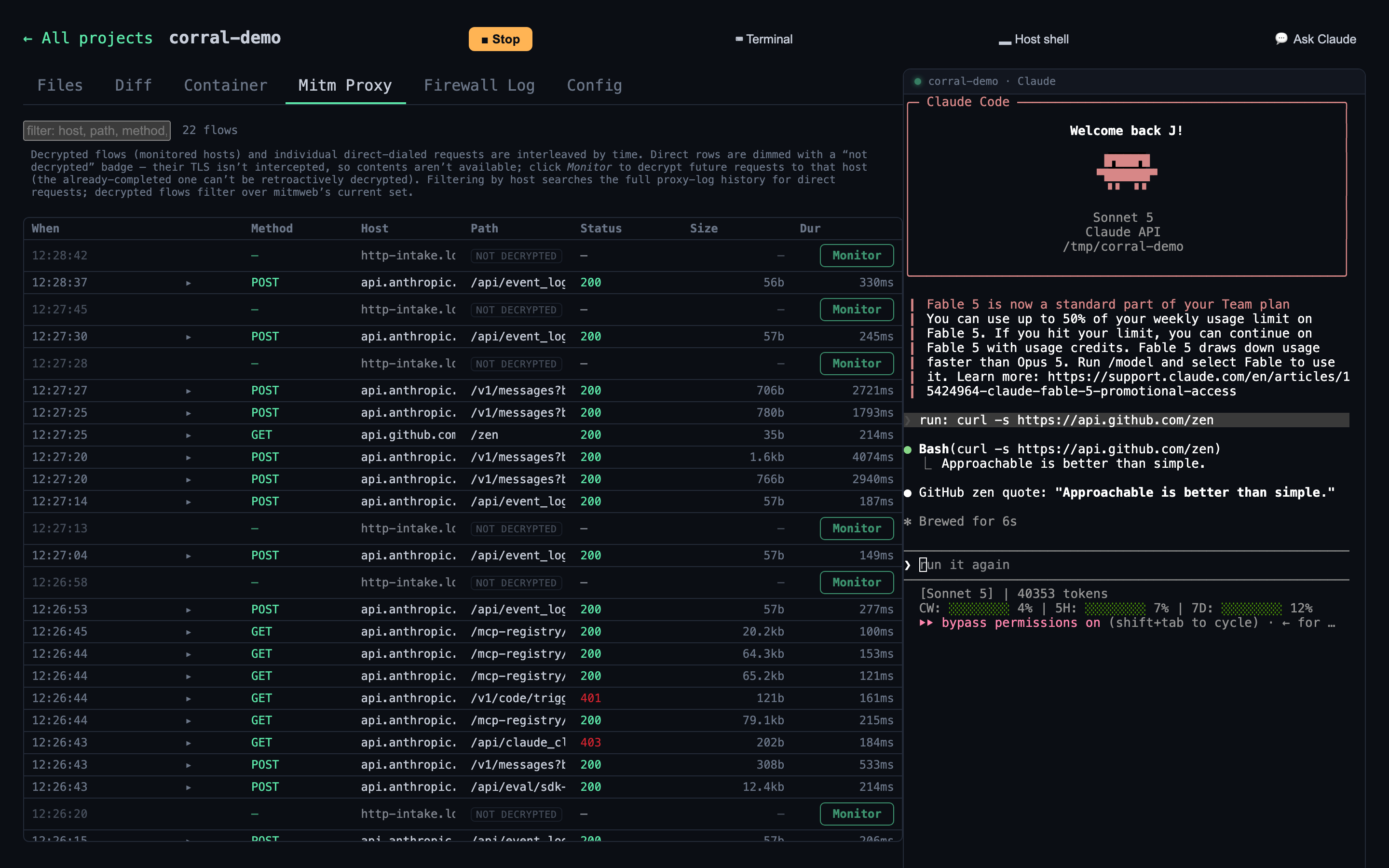 Every request that leaves the sandbox, Claude’s and the inner containers’ alike, shows up here. Handy for building the allowlist, and for that “wait, why is it talking to that” moment.
Use an ssh-agent, don’t hand over keys. It seems like a good idea to just give every container access to the host’s ssh-agent and move on. But maybe we don’t want it to have access to certain keys, or maybe only in certain scenarios. The better answer is a single ssh-agent that holds the keys, where the inner sandboxed Claude never has access to the key material. It just mounts the agent’s socket into the container, the same trick Docker’s secret SSH mount uses at build time to let a git clone work without the key ever landing in a layer. The agent protocol has no “give me the private key” operation, so even if something inside the box got fully compromised, it can ask for signatures but it cannot walk off with the key. Same philosophy as the credential swapping. The secret never enters the room, only the ability to use it does.
Reusable volumes are the difference between fun and unbearable. A pristine, disposable environment is great right up until Claude has to reinstall the entire world every single run. Cold starts where it re-downloads dependencies, rebuilds images, and re-clones things get old fast, both for your patience and your allowlist logs. Persisting the right volumes between runs (package caches, build layers, that sort of thing) while keeping the actual workspace throwaway is one of the bigger quality-of-life wins. Ephemeral where it matters, cached where it doesn’t.
Watch what leaks in the boring places. The dramatic failure mode is a credential getting stolen. The quiet one is a token showing up somewhere you weren’t looking: an env var visible in proc/*/environ, the use of strings on a binary, a secret echoed into a log, a key that wandered into a captured conversation, Claude retrieving the injected token from mitm with the use of CLI commands… Every conversation and every log gets captured, which is wonderful for the foreman Claude and slightly terrifying the first time it dawns on you that a token could ride along in one. A lot of the unglamorous work is making sure the stuff stored on purpose doesn’t quietly hoover up the stuff that very much should not be stored.
Try it today
That’s the tour. Supply chain attacks aren’t slowing down, agents want to run more code than anyone can babysit, and the safest place to let that happen is somewhere the blast radius is zero. That’s the whole idea behind Corral, and it’s open source, so it can be poked at, forked, or torn apart.
You’ll need Docker and the Claude Code CLI (signed in via claude). Then:
curl -fsSL https://raw.githubusercontent.com/scoutapp/corral/main/scripts/install.sh | bash
From there it’s basically two commands to get going:
corral populate-proxy-credentials    # set your credentials (once)
corral start                         # start Claude + open the dashboard
corral start drops Claude into the cage and opens the dashboard, and from there it’s your ranch to run. Spinning up a project is just the “+ New project” button, no separate setup step needed. Prefer the terminal? cd into a repo and run corral init to wire it up from the CLI instead.
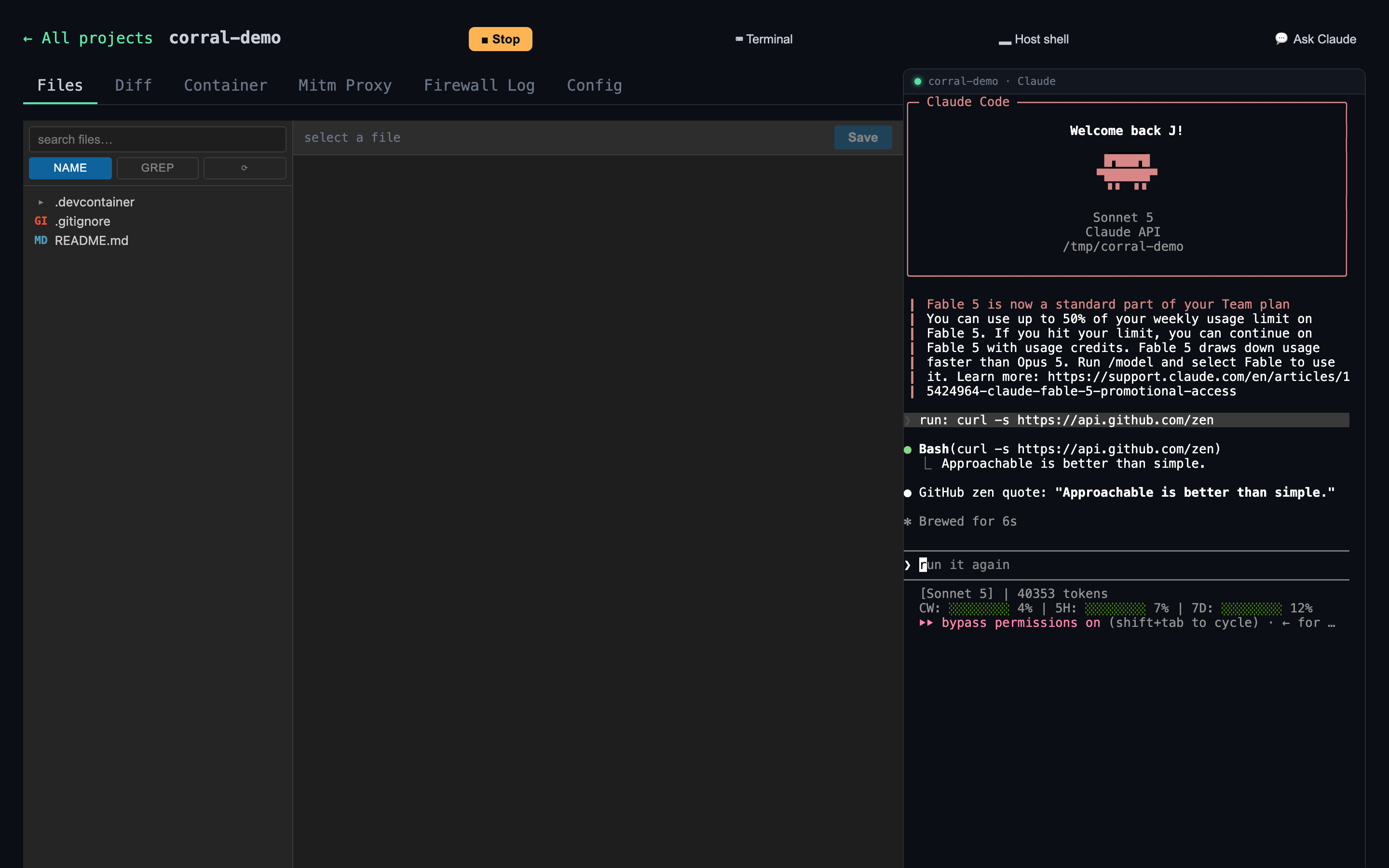 This is what you get: files and diff on the left, a live Claude session on the right, and tabs for peeking at the proxy, the firewall log, and the container itself.
The repo, docs, and issues all live at github.com/scoutapp/corral. If you build something interesting on top of it, or find a way out of the pen nobody thought of, that’s exactly the kind of thing worth hearing about.
For application monitoring with errors, logs, and traces, Scout Monitoring provides the fastest insights without the bloat.