
The latest release (0.3.0) of Scout’s Elixir APM package adds the ability to monitor GenServer calls. What is GenServer and how do you monitor it?
A short intro to GenServer
If you’re coming from a Ruby background, you’ve probably used Sidekiq or similar to do background work outside of the web request cycle. With Elixir, there are multiple legitimate ways to do background work.
GenServer - short for generic service - is one way to perform work asynchronously. GenServer gives you a lot more flexibility than a specific background library.
Instrumenting GenServer calls
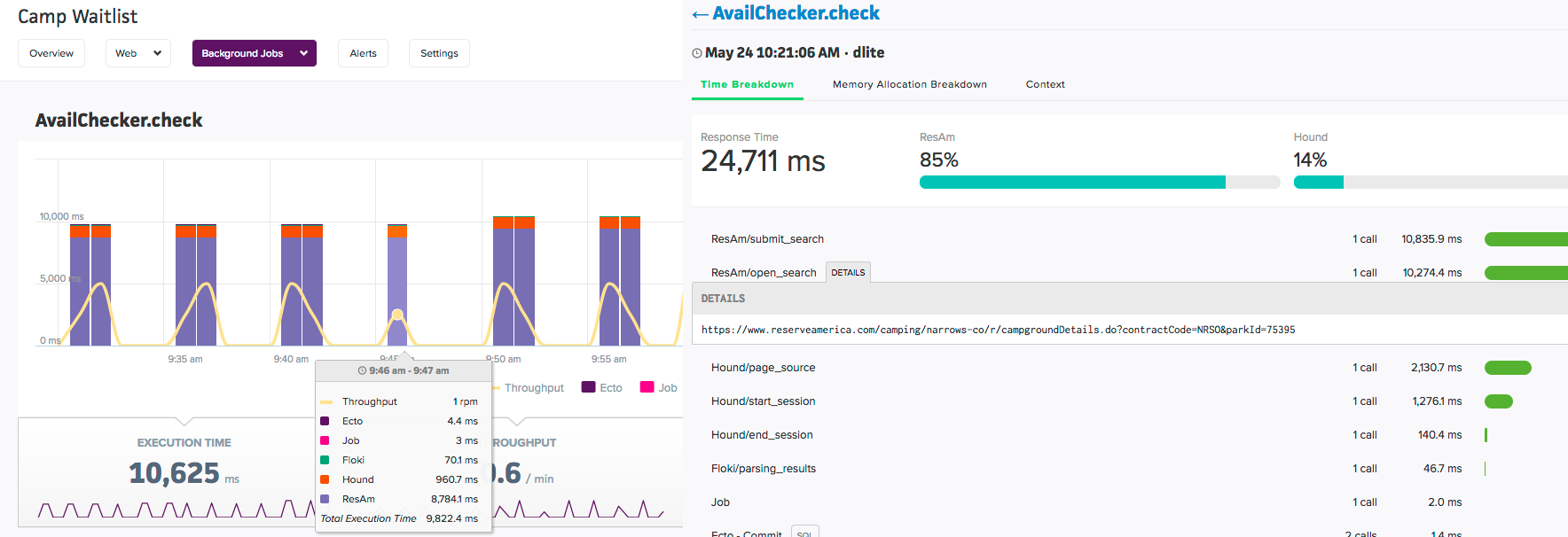
The scout_apm package lets you monitor the execution of GenServer calls. You’ll get high-level metrics, like throughput and and mean/95th call times and detailed transactions traces (like Ecto queries and HTTP calls).
Instrumenting GenServer is straightforward: - use our tracing library, then instrument via @transaction module attributes. An example:
defmodule Flight.Checker do use GenServer use ScoutApm.Tracing
Will appear under “Background Jobs” in the UI, named “Flight.handle_check”.
@transaction(type: “background”, name: “check”) def handle_call({:check, flight}, _from, state) do # Do work… end
GenServer data appears in the “Background Jobs” area of the Scout UI. Get started on our free plan or checkout our Elixir docs.